How to Write a Google Review for Any Business in 2026

In 2026, online reviews really change what people buy. They also change how businesses are seen. Almost all shoppers, about 95%, read reviews. They do this before they buy something. A Google review is a strong way to share what you think. You help other shoppers choose wisely. Your detailed Google review also gives good ideas to businesses. This makes buying and selling clear for everyone. When you write a Google review, you help this system. Every Google review helps shoppers. It also helps the business.
Key Takeaways
Google reviews help other shoppers. They also help businesses. They tell about your experience. They give good ideas.
Always follow Google's rules. Do this when you write a review. This makes reviews fair. It makes them real for all.
Write reviews that are clear. Make them detailed. Say what you liked. Or say what could be better. Give examples.
You can write a Google review. Use your computer or phone. Use Google Search. Or use the Google Maps app.
Your review helps businesses get better. They use your ideas. They make their services better for people.
Before You Write Your Google Review
Public Visibility and Anonymity
You want to write a Google review. Know that your words will be public. Everyone can see them. The business will see it. Other shoppers will see it. You can use your real name. Or you can use a made-up name. You can change your Google settings. This hides your full name. You can still leave a review. Your thoughts help others. Think about what you write.
Google Review Policies
Google wants reviews to be fair. They want them to be helpful. Many people check reviews. Computers also check them. They look for broken rules. In 2022, Google stopped much fake content. They removed many bad reviews. Google's rules make sure reviews are real. You cannot post fake things. You cannot use stolen photos. Reviews must be on topic. Do not use mean words. Do not attack people. Do not post wrong content. Google removes reviews for other reasons. You cannot review your own business. You cannot pay for reviews. These rules keep feedback honest. Google often updates its rules. They use AI to find bad content. People can report fake reviews. This keeps Google trustworthy.
Elements of a Helpful Review
Write a review that helps. Be very clear. Think about your time with the business. What did you like? What could be better? Talk about the service. Mention product features. Was the staff friendly? A good review gives examples. Do not just say "good service." Say, "The cashier quickly helped me." This detail is helpful. It helps other shoppers. It also helps the business. Your detailed review makes a difference.
How to Write a Google Review: Step-by-Step
You want to share your experience with a business. Knowing how to write a Google review is simple. Google offers several ways to do this. You can use your computer or your phone. This section shows you how to write a Google review step-by-step.
Desktop Review Process
You can easily leave a Google review from your desktop computer. Follow these steps:
Open your web browser. Use Chrome, Firefox, or any other browser.
Go to Google Search. Type the business name into the search bar.
Find the business listing. Click on the business from the search results. You will see its profile.
Locate the reviews section. On the left side of the business profile, scroll down. You will see the reviews.
Start your review. Click the "Write a review" button. A new window will appear.
Rate and write. Choose a star rating. Then, type your thoughts in the text box.
Post your review. Click "Post" or "Submit" when you finish.
Alternatively, you can use Google Maps directly:
Open Google Maps. Go to maps.google.com in your browser. Sign in to your Google account if you are not already.
Search for the business. Type the business name into the Google Maps search bar.
Access reviews. On the left side of the page, click "Reviews."
Begin writing. Click "Write a review." You can give a star rating, write your text, and add photos.
Submit your review. Click "Post" to submit a review.
Mobile Browser Review Process
Leaving a Google review on your phone's browser is much like using a desktop.
Open your mobile browser. Use Chrome, Safari, or another browser on your phone.
Go to Google Search. Type the business name into the search bar.
Tap the business listing. Find the business in the search results and tap it.
Scroll to reviews. Look for the reviews section on the business profile page.
Tap to write. Tap the "Write a review" button.
Rate and describe. Select your star rating. Type your review in the box.
Post your feedback. Tap "Post" to share your google review.
Google Maps App Review
The Google Maps app on your phone also makes it easy to leave a Google review.
Open the Google Maps app. Find the blue and white Google Maps icon on your phone and tap it.
Search for the business. Use the search bar at the top to find the business you want to review.
View business details. Tap on the business name to see its information.
Go to reviews. Scroll down to the "Reviews" section.
Start writing. Tap "Write a review" to begin. You can also tap "Contribute" and then choose to write a review or add a photo.
Complete your review. Give a star rating and type your comments.
Publish your review. Tap "Post" to share your thoughts on Google Maps.
When You Cannot Leave a Google Review
Sometimes, you might find you cannot leave a Google review. Several reasons explain this:
You are not signed in. You must sign in with a Google Account. If you use incognito mode or a work account, you might have trouble.
The business has reviews disabled. Google might turn off reviews for a business. This happens if they see strange activity or policy problems. You might not see the "Write a review" button.
The business type is not eligible. Some places cannot get public reviews. These include schools, government offices, hospitals, and religious groups. Google does this to protect privacy.
Your review violates policies. Google removes reviews that break its rules. This includes fake reviews, promotional text, personal details, or offensive language.
Your account has issues. New Google accounts or those with little activity might have limits. Google checks how old your account is and how often you use it. If you post many reviews quickly or from new places, Google might flag it.
Technical problems exist. Your device might have an outdated app or browser issues. Clear your cache or update your app.
Google is moderating. Google sometimes holds reviews for a manual check. This happens often for new users or very long reviews.
Knowing how to write a Google review helps you share your voice. It also helps other consumers and businesses.
Crafting Effective Google Reviews
You want your words to help people. You also want them to help the business. Good Google reviews give clear facts. This part shows how to write reviews. These reviews will make a difference.
Writing Positive Reviews
A good Google review helps a business a lot. When you write a good review, tell specific things. You can talk about friendly staff. They might have greeted you well. You can point out good service. Maybe the products were great. A smooth visit makes a good story.
You can make your review special. For example, tell a short story. Maybe a dish tasted like "grandma's recipe." This makes it unique. You can also name good employees. This helps the business see them. It also helps new customers.
Reviews are more real with details. You should say why you liked the business. Was the service great? Were workers helpful? You can even say the website was easy. If you shop there often, say so. This makes your good review stronger. You can also add pictures or videos. These show what you mean. They show products or the place.
Writing Constructive Negative Reviews
Sometimes, things are not perfect. When you write a bad Google review, try to help. This means you explain the problem clearly. Stick to the facts. Do not use angry words. Do not attack people. For example, do not say "The food was terrible." Instead, say, "The pasta was cold. The sauce had no taste."
You can suggest ways to make it better. This shows you want the business to do well. It helps them fix things. A helpful bad review helps the business grow. It also helps other shoppers. They learn about problems. Your goal is to help. Do not just complain.
Specificity and Detail in Reviews
Specific details make your Google review better. They help other shoppers choose well. When you give good details, your review is more useful. People think it helps more. Being specific is key to good facts. It shows your information is enough.
You should point out special parts of a product or service. This could be fast service. Or a helpful feature. Your own story makes the review real. Even in good reviews, suggest improvements. This shows you care. It shows you want quality. Your detailed review helps the business. It also helps future customers. Your review truly matters with specific facts.
Managing Your Google Reviews
You can manage your own feedback. Businesses also use this feedback. They use it to grow and improve.
Editing or Deleting Your Review
You might want to change your mind. You can edit or delete your Google review.
To edit a Google review from your computer:
Open Google Maps in your browser.
Click the menu in the top-left corner.
Go to "Your contributions," then "Reviews."
Find your review. Click the three-dot menu.
Choose "Edit review." Make your changes.
Click "Post" to save.
To delete a Google review from your phone:
Open the Google Maps app.
Tap the "Contribute" icon. Then tap "View your profile."
Find the review you want to remove.
Tap the three-dot menu.
Select "Delete review." Confirm your choice.
Sharing Your Review
You can share your Google review with others. After you write a review, Google often gives you an option to share it. This lets your friends or family see your experience. You can post it on social media or send it directly.
How Businesses Use Your Feedback
Businesses value your feedback. They use it to make things better. They look for common themes in Google reviews. This helps them find what customers like most. They also spot problems that happen often. For example, if many reviews mention slow service, the business knows to work on speed. Your reviews help them understand the overall customer mood.
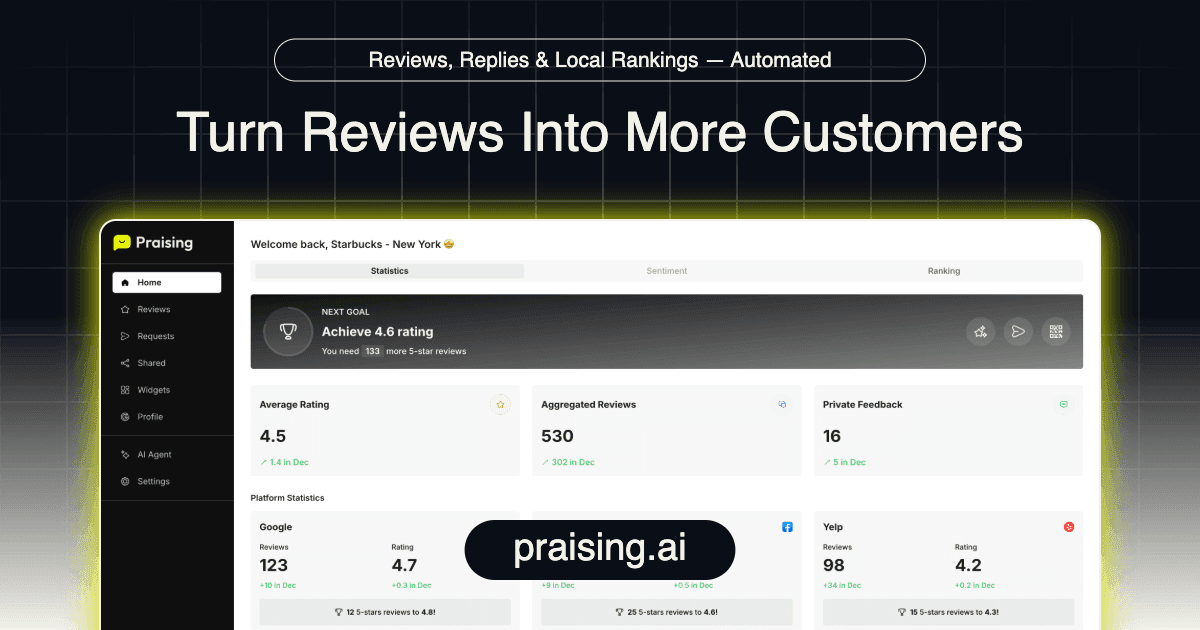
Businesses also work to get more reviews. They might give you a direct link to leave a Google review. They ask in person or send email requests. Tools like Praising.ai help businesses collect, manage, and reply to reviews efficiently. This platform helps businesses get more reviews and use them to improve.
The Impact of Your Google Review and Praising.ai's Role
Your google review is very powerful. It changes what people think. It helps businesses grow. Knowing its full effect helps you use it well.
Reporting an Inappropriate Review
You might see a google review that seems wrong. It might be fake. You can report bad reviews. Google wants its site to be trusted. You should report reviews that have:
Mean words about people.
Comments that do not matter.
Content not about services.
Focus on a rival.
Spam links or ads.
Bad things said about someone.
Content not about the deal.
Made-up reviews.
Reviews falsely saying bad acts.
Bullying.
Reviews from people who never met the business.
You can report a bad google review in a few ways:
- Via Google Maps:
Open Google Maps.
Find your Google Business Profile.
Look for the review you want to report.
Click the 'More' icon. It looks like three dots.
Choose 'Flag as inappropriate.'
Via Google Search:
Go to Google.com.
Find your Google Business Profile.
Click on 'Google Reviews.'
Find the exact review.
Click the 'More' icon. It looks like three dots.
Choose 'Report review.'
Say what rule was broken.
Through Your Google Business Profile Account:
Log in to your Google Business Profile.
Go to 'Reviews.'
Find the review to flag.
Click the 'More' icon. It looks like three dots.
Choose 'Flag as inappropriate.'
The Future of Reviews
Online reviews keep changing. How people shop changes too.
Trend Category
Consumer Reading Habits
Fewer people 'always' read reviews. More people 'regularly' read reviews.
Platform Popularity
Google is still the main site. Other sites like YouTube, Instagram, and TikTok are now seen as real review places.
Trust in Reviews
People trust online reviews less now. This means they think more carefully.
Importance of Review Factors
People care less about how new a review is. They also care less about five-star ratings.
Fake Reviews
Fewer people can spot fake reviews. This might be because checks are better. Or fake reviews are smarter.
Willingness to Write Reviews
Almost three out of four adults in the US have written an online review. This happened in the last five years.
Ready to grow?
Turn happy customers into 5-star reviews
Praising.ai automates review collection across Google, Trustpilot, Yelp, and 20+ platforms. Businesses see an average 3x increase in reviews within 30 days.
Get weekly review tips
Join 2,000+ business owners getting actionable strategies to grow reviews and revenue.
No spam. Unsubscribe anytime.