Mastering Google Reviews 10 Tips for Sharing Your Link Effectively

Google reviews are incredibly important for your business, building trust and boosting your visibility in local searches. What customers say in these reviews significantly influences purchasing decisions. However, simply providing excellent service isn't enough to consistently generate more reviews. You must actively ask customers for their feedback and make the process as simple as possible. This is where your unique my Google reviews link becomes crucial. This direct link is a powerful tool.
Consider this: 98% of consumers report using reviews to guide their buying choices. This statistic underscores the immense power of online reviews in enhancing your business's online image and strengthening your online reputation. The first step is to locate your specific my Google reviews link. You'll need to know how to retrieve this link, which originates from your Google Business Profile. This blog post will provide you with 10 effective strategies to share your my Google reviews link, helping you acquire many more customer reviews for your business. Each method is designed to help you gather more customer reviews, which are essential for a strong online presence.
Key Takeaways
Google reviews are important for your business. They build trust and help people find you online.
You need to find your special Google review link. You can get it from your Google Business Profile.
Share your Google review link in many ways. Use emails, social media, and even QR codes in your store.
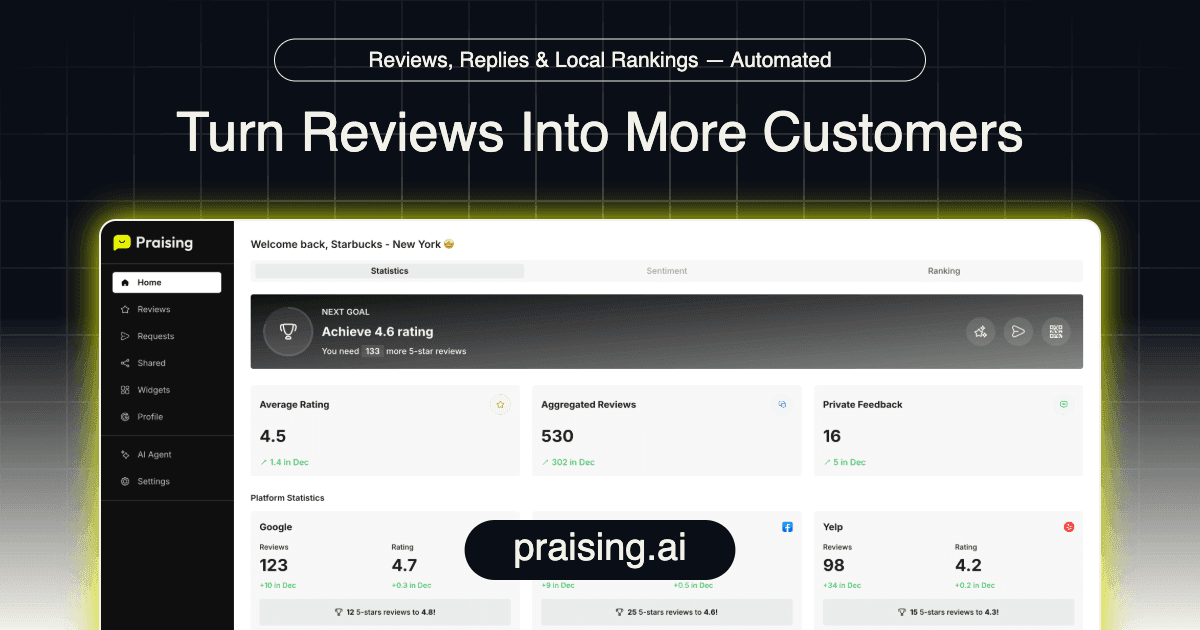
Automate review requests with tools like Praising.ai. This makes getting reviews easy and consistent.
Do not offer money for Google reviews. Focus on good service and make it simple for customers to leave feedback.
Get Your Google Review Link
You need to know how to get your special my Google reviews link. This helps you get more reviews. This link lets customers give feedback. Knowing how to make your my Google reviews link is important for any business.
Get to Your Google Business Profile
Your Google Business Profile is where you handle your business on Google. You must go to this profile. This is how you get your my Google reviews link. Here are two ways to get to your business profile:
Use Your Own Google Account: First, have an active Google account. Then, look for your business profile. Click 'claim this business' to start. Fill out a short form. This form asks about your link to the business. It also asks what access you need. Send the form to finish your request. If Google says yes, you will get a message. Then you can manage the profile. If they say no or do not answer, talk to the owner.
Use Organization Business Profile Manager: Go to the Organization Business Profile Manager. Find the business profile you want. Send a request to get in. Check the invite status there. Follow up on invites that are waiting. Keep talking to the current owner. This helps get quick approval.
Getting to your profile is the first step. It helps you get more reviews for your business.
Make a Direct Google Review Link
You are in your Google Business Profile. Now, making your direct my Google reviews link is easy. This link makes it simple for customers to leave a review. You can make your my Google reviews link fast.
Log in to your Google Business Profile dashboard.
Pick the business place you want to manage.
Find and click 'Get more reviews' on the dashboard.
Copy the short web address given. This is your my Google reviews link. You can now share this link.
This direct my Google reviews link makes giving reviews easy. It helps you get more reviews for your business.
Make Your Google Review Link Shorter
Your direct my Google reviews link can be long. A shorter link is easier to share. It looks better in emails. It also looks better on paper. You can use a tool like Bitly or TinyURL. These tools take your long my Google reviews link. They make it short. This makes your my Google reviews link easier to use. A short link helps more people leave a review. It makes the process smooth. This helps your business get more reviews.
Digital Ways to Share Your Google Review Link
You have your unique google review link. Now, you need to share it effectively. Digital channels offer many places to share google review links. These methods make it easy for customers to provide feedback.
Email Signatures and Campaigns
Your email signature is a powerful tool. You can add your google review link here. This makes it simple for customers to leave a review. Create a clear call-to-action (CTA). For example, "How did we do? Click here to let us know!" Make sure this CTA is short and easy to see. Place it near the bottom of your email signature. You can also use small icons or logos of review platforms. This helps grab attention. Keep the design clean and simple. You can also include your google review link in your marketing emails. This helps you get more reviews for your business.
Website Integration with Praising.ai Widgets
Your website is a central hub for your business. Integrate your google review link directly onto your site. Praising.ai offers widgets that display your reviews. These widgets make it easy for customers to see existing reviews. They also provide a clear path to leave a review. This integration helps build trust. It also encourages more online reviews.
Social Media Profiles and Posts
Social media is where many customers spend their time. Add your google review link to your social media profiles. You can put it in your bio or "about" section. Also, create posts specifically asking for reviews. Share your google review link in these posts. This makes it easy for your followers to give their feedback. This helps your business grow.
SMS and Messaging Apps
Text messages are very effective. They have a 98% open rate. This makes them great for sharing your google review link. Send a text message after a service or purchase. You can use simple templates. For example, "Hey, [customer name], thanks for being our customer! Please consider leaving us a review. [google review link]." Personalize these messages. This increases the chance customers will leave a review. Praising.ai can help automate these requests. This makes it easy to send your google review link to many customers.
Physical & In-Person Sharing Methods
You can turn in-person interactions into valuable online feedback. These physical methods make it easy for customers to leave a review. They bridge the gap between your physical business and your online reputation.
QR Codes on Receipts and Packaging
QR codes offer a quick way for customers to access your google review link. Place these codes on receipts or product packaging. Make sure the QR code leads to a mobile-optimized form. This form should have short questions and simple star ratings. You can offer incentives like discounts for future purchases. This encourages customers to scan and leave a review. For example, use a clear call to action like "Scan to Share Your Experience."
When you design QR codes, make them at least 1 cm x 1 cm for receipts. This ensures easy scanning. Use vector formats for printing. Avoid placing many QR codes close together. This prevents clutter. Dynamic QR codes are best. You can edit them after printing. They also provide tracking data for your business.
Business Cards and Flyers
Business cards and flyers are great for sharing your google review link. Include your business name, logo, and contact details. Briefly explain why customer feedback is important. Give clear instructions on how to submit a review. Add a QR code or a direct google review link. A short thank-you message also helps.
Design your cards with eye-catching Google branding. Show 5-star graphics. This prompts customers to leave you the best review possible. Your message should be concise and inviting. Thank the customer for their business. Explain that their feedback helps improve your service.
In-Store Signage and Displays
Place signs in your business where customers can easily see them. Put them near the checkout counter or exit. These signs should have a clear call to action. Include a QR code that links directly to your google review link. This reminds customers to share their experience before they leave. It makes leaving a review simple.
Direct Verbal Requests with Digital Follow-Up
Asking customers directly for a review is very effective. Train your staff to use a simple five-step script. First, thank the customer. For example, say, "Thanks again for your visit today." Second, remind them of a positive outcome. Say, "Glad you enjoyed your meal." Third, clearly ask for a review. "If you have a minute, would you share that in a Google review?" Fourth, reassure them it is easy. "It’s just a couple of taps, I’ll send the google review link." Fifth, explain the value of their feedback. "Your feedback genuinely guides what we improve next." Personalize these requests. Use the customer's name. Refer to the specific service they received. Always offer to send the google review link via text or email. You can also give them a physical card with the google reviews link. This helps them remember to leave a review later.
Automate Google Review Requests
It is easier to ask for Google reviews automatically. Your business gets more reviews this way. You do not have to do it by hand all the time. You can make asking for reviews simple.
Multi-Channel Automated Invites with Praising.ai
Praising.ai sends invites for reviews automatically. It uses many ways to do this. You can send requests by email. You can also send them by text. WhatsApp is another option. This reaches customers where they are. Praising.ai puts all your efforts in one place. It makes sure you always ask for reviews. This helps your business get more reviews. It makes the whole process easy.
Triggering Requests Post-Service or Purchase
When you ask for a review, timing is important. Ask when customers are happy. Ask when they remember their experience. Send a request a few days after delivery. You can also send it after an order. This gives time to try the product. Do not wait too long after they buy. This keeps customers excited. This helps you get more reviews.
Integrating Review Requests into Customer Journeys
Make asking for reviews a normal part of the customer's journey. First, pick a tool that can automate things. Praising.ai is one such tool. It works with what you already do. Second, set up when to send requests. Make plans to send requests at the best times. This could be after they use your product. You can target loyal customers. Third, make a simple request. Keep automated requests simple. Tell them clearly what to do. Do not use hard words. Include direct links to leave a review. Use the customer's name. Good integration means good follow-up. This shows good service. Automated follow-ups help customers get involved. This builds trust. It also brings them back to your business.
Advanced Strategies for More Reviews
You can get more reviews. Go beyond just sharing links. These tips help customers share.
Creating a Dedicated "Review Us" Page
Make a special page. Put it on your website. This page is for reviews. Customers find it easily. They can share their thoughts. Put your Google review link there. Add links to other review sites. This makes feedback simple. It shows you care. You will get more reviews. Explain how reviews help your business.
Ethical Incentives and Contests
You might want to give rewards. But Google does not allow this. Do not offer prizes for Google reviews. Focus on good service. Make leaving a review easy. If you offer a reward, be clear. Say it is for honest feedback. Not for a good review. Small discounts are better than cash. Follow all rules. This keeps reviews fair.
Capturing Video Testimonials with Praising.ai
Videos are very strong. They build trust fast. Praising.ai has video reviews. It helps you get them. These videos are good content. The tool records them. This builds more trust. It works for many businesses. Praising.ai helps share videos. Use short clips on social media. This gets new people. Put success stories on product pages. Use clips on landing pages. This helps with doubts. You can use them in ads. This gets more reviews. It builds a strong online presence. These real videos boost your trust.
You now know many ways. You can share your Google review link. Use these ideas often. This makes your online name better. Make it simple for customers. They can leave a review. This gets you more reviews. It makes your online name better. Praising.ai puts your reviews in one place. It helps manage your whole name. It sends requests in many ways. These include Email, SMS, WhatsApp, and QR. It uses AI to answer reviews. It works on over 25 platforms. You can show good feedback. Use website widgets. Share on social media. Praising.ai is the best answer for businesses. It gets you more reviews. It makes your rating score better. It uses what others say. This builds trust and gets more sales. Automate your reviews now!
FAQ
❓ How do I find my Google review link?
You access your Google Business Profile. Then, you find "Get more reviews" on your dashboard. Copy the short link provided. This link makes it simple for customers to leave feedback directly for your business.
🚀 Why should I share my Google review link often?
Sharing your link helps you get more reviews. More reviews build trust with new customers. They also improve your local search ranking. This makes your business more visible online. It helps new people find you.
🤖 Can Praising.ai help me get more reviews automatically?
Yes, Praising.ai automates review requests. It sends invites through email, SMS, and WhatsApp. This makes asking for reviews easy and consistent. It helps you gather more feedback without extra effort.
🎁 Can I offer customers rewards for leaving a Google review?
Google does not allow incentives for reviews. You should focus on providing great service. Make leaving a review simple for your customers. This encourages honest feedback without breaking any rules.
Share this post
Ready to grow?
Turn happy customers into 5-star reviews
Praising.ai automates review collection across Google, Trustpilot, Yelp, and 20+ platforms. Businesses see an average 3x increase in reviews within 30 days.
Get weekly review tips
Join 2,000+ business owners getting actionable strategies to grow reviews and revenue.
No spam. Unsubscribe anytime.